How to ship a fragile 3D print
This guide was drafted with AI assistance.
The packaging insert generator presses an impression of your part into a printable case, so it sits in a pocket shaped like itself and cannot move. Pick two halves, a hinged case or an open tray, print it pockets-up, then drop the part in and post it.
What the generator does, and what it doesn't
Handled for you
- Presses a soft impression of your part into two box halves, so it is cradled rather than rattling
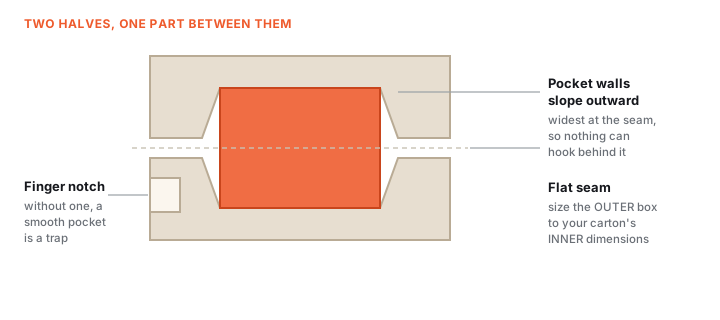
- Forces a monotonic release draft, which means the finished pocket physically cannot have an undercut
- Can size the outer box to your exact carton, and adds finger notches and edge chamfers
- Draws a live wireframe of the predicted outer box and seam before you generate anything
Still your call
- The impression is only as good as the model you upload. A rough scan gives a rough pocket
- It is sized for the part, not the box. Check the outer dimensions against the carton you actually have
If the generator refused your file, the message is explained here: why was my model rejected. Almost every rejection is the same thing, a mesh with holes, and the “Fix it for me” button in the popup resolves most of them in one click.
What a packaging insert is
Bubble wrap stops knocks. It does not stop the part rattling, and a thin fin or a spout still snaps. An insert holds the part on every side: a printed case with a pocket in the shape of your model, slightly larger, tapered so it always lifts back out and never grips. Print it once, then reuse the file for every unit you ship.
Make one in 3 steps
Generate the case
Upload the STL of the part you ship. Choose how it closes, set the fit (Normal holds the part without squeezing it), and add an opening feature so you can get the part out again. Shipping several of the same item? Raise the part count for a pocket each.
Print it
0.2 mm, 3 walls, 15% infill, no supports, pockets facing up. PETG flexes instead of cracking when a parcel is dropped; PLA is cheaper and fine, hinges included. See the filament comparison if you are unsure.
Pack and post
Drop the part in, close the case, tape it shut if it is two halves, then put it in the carton. A sheet of paper to stop it sliding is plenty. For something very delicate, ship one case inside a second one.
Which options matter
| Option | Pick this when |
|---|---|
| Two halves | Most protection. Tape them shut. The default. |
| Hinged case | The customer keeps the case. Prints flat, no lid to lose. |
| Open tray | Least filament and time. The carton lid closes it. |
| Fit: tight / normal / loose | Tight for smooth solid parts, normal for almost everything, loose for spiky or delicate shapes. |
Insert troubleshooting
The part rattles inside the pocket
Cause The impression was taken from a model that does not match the real object, or the soft-impression setting left too much room.
Fix Check the model against the part with calipers before generating. A scan that is 1 mm generous everywhere produces a pocket that is 1 mm generous everywhere.
Quick fix A single layer of foam or tissue in the pocket takes up slack and costs nothing. That is what commercial inserts do too.
The case will not close, or bulges at the seam
Cause The part is fractionally taller than the two pockets allow, so it is holding the halves apart.
Fix Regenerate with a little more depth. Also check for a first-layer elephant's foot on both halves, which adds height exactly where the two faces have to meet.
How do I get the part back out?
Add an opening feature at generate time. Without one the pocket is a smooth trap.
Finger notch Cuts through the side wall and grips best. The right default.
Thumb scallop A dish in the face that keeps the case fully closed, for anything that ships loose in a larger box.
Pry slot A thin gap for a coin, when the part is too small to grip at all.
PLA or PETG?
PETG if the box is heavy or the contents are precious: it bends and springs back where PLA snaps.
PLA Fine for light parts and short journeys, hinges included, and it prints faster and cheaper. A cracked insert still protects better than none.
Can I make it fit a box I already buy?
Yes. Switch the outer size to Fit a carton and enter the carton's inner length, width and height.
Measure inside Those are INNER dimensions. Measuring the outside of the box gives you a case that is a wall thickness too big on every axis, which is the mistake that costs a whole print.
Made by meshcast.app. Got stuck? Email a photo and I'll help you debug.