Personalized Christmas ornament: a name on the tree, 3D printed
This guide was drafted with AI assistance.
Open the Christmas ornament maker, pick a bauble, star or gingerbread man, type the name and download an STL or 3MF. The name is sized to fill the face automatically, the ornament prints flat with no supports, and the raised name and trim sit in their own band of height, so one filament change gives you two colors on any printer. 80 mm tall is the default, a loop on top takes a ribbon.
Pick a bauble, star or gingerbread man, type the name, download the STL. Free, in your browser.
Open the ornament maker →What you get
A flat ornament, not a ball: the shape you picked as a plate, the name raised on its face, an optional raised trim along the edge, and a lug with a ribbon hole on top. The bauble gets a cap drawn on, the gingerbread man gets eyes, a smile and icing, all raised like the trim.
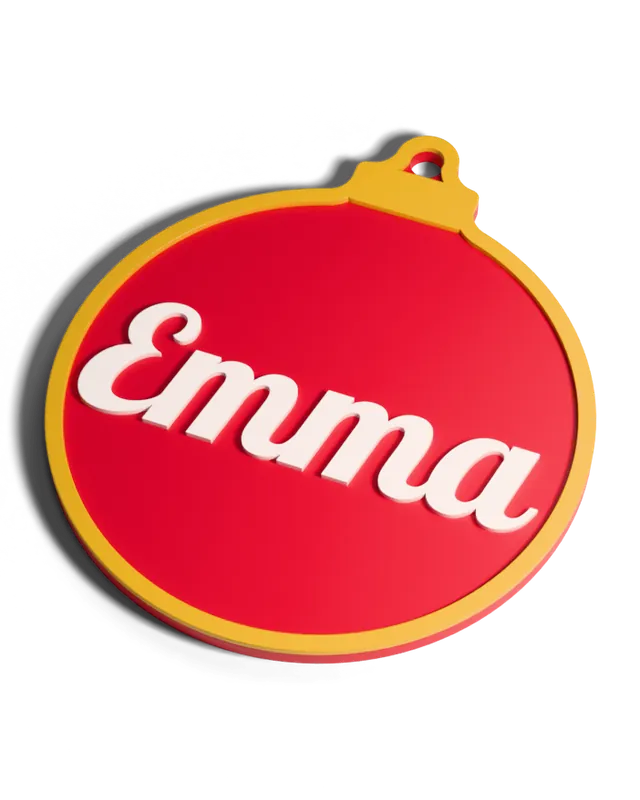
Flat name ornaments are the fastest Christmas print there is: no supports, no hollow ball, nothing to glue. If you want a round, open lattice bauble instead, that is a different technique, covered in mesh Christmas ornaments.
Step by step
Pick a shape
Bauble, star or gingerbread man. The bauble has the widest face, so it suits long names best. Picking the gingerbread man turns a red ornament brown with white icing.
Type the name
Up to 20 characters per line, with an optional second line for a year, a surname or "First Christmas". Six fonts, from Retro Script (the default) to Poster Block. Under the field the tool shows how tall the letters came out.
Choose colors and size
Four ready color sets (red, white and gold; green, white and red; gingerbread and icing; navy and silver) or three colors of your own for the ornament, the name and the trim. Height runs from 50 to 120 mm.
Download STL or 3MF
STL is one fused body, for one color or a filament change. 3MF carries the ornament, the name and the trim as three parts with their colors already set, for an AMS, MMU or tool changer.
Print face up
Straight onto the bed as previewed. The readout under the size tells you the printed footprint, loop included, and the height of the color change.
Getting the name right
There is no font-size slider on purpose. The name grows until it touches the trim and stops there, so "Emma" and "Maximilian" both fill the face. What changes is how tall the letters end up:
- Long name, small letters: split it over two lines, make the ornament taller, or switch to the bauble.
- Thin script strokes: strokes under about 1 mm are too fine for a 0.4 mm nozzle. Fun & Bold or Poster Block print cleaner at small sizes.
- More room for the name: turn off the raised trim, or make it narrower under Advanced settings (1.2 to 5 mm, default 2.4 mm).
- Accents and special letters: if a font cannot draw a character, the tool tells you instead of leaving a gap. Pick another font for that name.
Two colors from one nozzle
The ornament is built in two bands. The body runs from the bed to its thickness (2.4 mm by default, adjustable from 1.6 to 4 mm); the name, the trim and the shape's details all sit on top, 1 mm high by default (0.4 to 2 mm). So everything raised comes out in the second color after one filament change:
- Slice the STL in one color.
- Add a color change (M600 or your slicer's "pause / change filament") at the height the tool shows, 2.4 mm with the defaults.
- When the printer pauses, load the second color and resume.
Print settings
| Setting | Use | Why |
|---|---|---|
| Layer height | 0.2 mm | The default thicknesses are whole 0.2 mm layers, so the color change lands cleanly |
| Walls | 3 perimeters | Script letters are mostly perimeter |
| Infill | 15 to 20% | The ornament is thin; the walls carry it |
| Supports | None | Flat on the bed, face up |
| Material | PLA | Stiff, cheap, every Christmas color is easy to buy; silk and glitter PLA catch the tree lights |
More on filament choice in PLA vs PETG vs PP vs TPU. For several colors without an AMS, see multicolor printing without an AMS.
Hanging it
- Ribbon or twine: the loop on top has a 5 mm hole by default. Make it up to 8 mm under Advanced settings for a wider ribbon.
- Ornament hook: the default hole takes a standard wire hook.
- No loop at all: set the ribbon hole to 0 and glue a hook or a magnet to the back, or stand it in a slot as a place card.
Gift and selling ideas
- A family set: one name per ornament, same shape and colors, hung together.
- Gift tags: a 50 to 60 mm ornament tied to the present, kept on the tree afterwards.
- Baby's first Christmas: the name on the first line, the year on the second.
- Place cards for Christmas dinner, ribbon hole at 0.
Selling them: name ornaments are a classic seasonal craft-market and Etsy item. Free downloads are for personal use and gifts and carry a small Meshcast mark. To sell what you print you need Pro, which adds commercial rights and swaps the mark for your own logo.
Problems
The name came out tiny
Cause It is fitted inside the shape, so a long name gets small.
Fix Make the ornament taller, split the name over two lines, or pick the bauble.
Thin script letters did not print
Cause Strokes under about 1 mm are too fine for a 0.4 mm nozzle.
Fix Pick a bolder font, make the ornament bigger, or turn off the trim to give the name more room.
The second color started a layer late
Cause The change was placed at the first layer that shows the name in the slicer preview.
Fix Put it at the layer the tool names. The preview shows the top of each layer; the change has to happen before it starts.
FAQ
Can I print a two-color name ornament without a multicolor printer?
Yes. The name and the trim stand on top of the ornament in their own band of height, so you slice it in one color, add one filament change at the height the tool shows (2.4 mm with the default thickness), and load the second color when the printer pauses.
How big should a personalized ornament be?
70 to 90 mm is the usual tree ornament size, and 80 mm is the default. The tool goes from 50 to 120 mm. A long name gets bigger letters on a bigger ornament, because the name is fitted to the face rather than set at a font size.
What if the name is too long?
The tool tells you how tall the letters came out and warns when they are too small to print cleanly. Split the name over two lines, make the ornament taller, pick the bauble, which has the widest face, or turn off the raised trim to give the name more room.
Does a 3D printed name ornament need supports?
No. It lies flat on the bed and everything raised sits directly on the layer below it, so it prints face up exactly as previewed, with no supports.
Can I sell ornaments I make with it?
Free downloads are for personal use and gifts, and carry a small Meshcast mark. To sell what you print you need Pro, which adds commercial rights and swaps the Meshcast mark for your own logo.
Made by meshcast.app. Hung one on your tree? Send a photo, we'd love to see it.