Lithophane Christmas gift: turn a photo into a lamp
This guide was drafted with AI assistance.
A lithophane is a white print that shows a photo only when light shines through it, which makes it one of the best photo gifts you can 3D print for Christmas. Upload the photo to the free lithophane generator, choose a flat panel, a curved panel, a lamp that sits on a 38 mm LED tea light, a moon, or a round photo ornament with a hanging loop, and download the STL. Print in white PLA, 0.1 to 0.12 mm layers, 100% infill. Give it with its light.
Upload a photo, pick a panel, lamp, moon or ornament, download the STL. Free, and the photo never leaves your browser.
Open the lithophane generator →Pick the format first
The same photo makes a very different gift depending on its shape. Decide where it will live, on a shelf, a bedside table or the tree, and pick the format from that.
| Format | In the tool | Best as | Light |
|---|---|---|---|
| Flat panel | Flat, Rectangle (30 to 250 mm wide, 100 mm by default) | A photo for a window or a frame | Window, LED panel or LED photo frame |
| Curved panel | Curved, bend 45° to 240° (120° by default) | A photo that stands on a shelf by itself | LED tea light behind it |
| Photo lamp | Lamp, 50 to 200 mm across (80 mm by default) | A night light, the photo wraps all the way round | LED tea light on the tea-light ring |
| Moon | Moon, a sphere with a 30 to 70 mm opening | A round lamp for a child's room | LED through the opening |
| Photo ornament | Flat, Circle or Heart, Hanging loop on | A photo on the tree | Tree lights or a window |
The lamp is the classic Christmas lithophane: one photo, or a wide panorama, wrapped round a cylinder. With Tea-light ring as the base it gets a 2 mm floor with a 30 mm hole that a standard 38 mm LED tea light sits on, with the switch still reachable from below. Open bottom leaves just the wall, to set over any light.
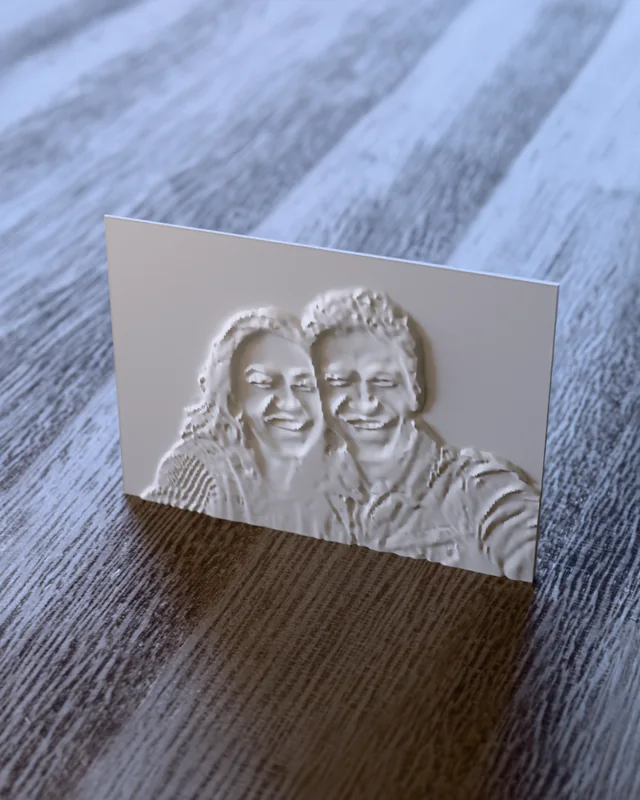
Pick the photo: this matters more than any setting
A lithophane has only a few millimetres of thickness to express the whole photo, so it compresses contrast hard. The pictures that work as gifts are also the ones that work technically:
- Faces filling the frame. Grandchildren, a couple, a new baby. Crop tight before you upload: a face that fills the frame reads far better than the same face at a quarter of the frame.
- One subject, plain background. A pet against a wall, not a pet in a busy living room.
- Clear light and dark. A photo taken in good light. Very dark photos print uniformly thick and stay dark.
- Old family photos work well if they have contrast. Scan them or photograph them flat, then raise Contrast in the tool.
Writing in the photo, like a sign or a T-shirt? Tick Mirror if it comes out backwards for the side you will view it from. Invert flips light and dark, which you almost never want for a portrait.
Step by step
Upload the photo
JPG, PNG or WebP. The conversion runs on your device, so a family photo never leaves your browser.
Choose the shape and size
Pick Flat, Curved, Lamp or Moon and set the size in millimetres. With Keep the photo's proportions on, the height follows the photo, so nothing is stretched.
Tune it with the light on
Tick Preview with the light on: the preview shows the panel glowing from its real wall thickness. Raise Contrast on a flat, evenly lit photo, lift Brightness on a dark one. Detail (Fast, Balanced, Fine) sets the mesh resolution; Fine looks best and makes a bigger file.
Add the finishing touch
A border frame (2 to 10 mm, under Advanced settings) makes a flat panel look finished and stiffer. On a lamp, choose the tea-light ring. On a circle or heart, tick the hanging loop.
Download and print
STL or 3MF. It opens in the slicer the way it should print, with no supports: panels, curves and lamps standing up, circles and hearts lying flat, the moon on its opening.
Test it with its light
Hold it in front of the light it will live with before you wrap it. If it looks flat, the fix is usually the photo or the light, see Problems below.
Print settings
| Setting | Use | Why |
|---|---|---|
| Material | White or natural PLA | Diffuses light evenly; silk and glitter PLA scatter it |
| Layer height | 0.1 to 0.12 mm | Layer height is the tonal resolution here |
| Infill | 100% | Any gap shows as a grey haze when lit |
| Line width | 0.4 mm | Keeps the thin bright areas solid |
| Speed | Slower than usual | Thin walls printed fast under-extrude and show bands |
| Brim | Yes, for tall panels | A tall thin panel has a small footprint and a lot of leverage |
Rough times at these settings (our estimates, your printer will differ): a small photo ornament about an hour, a 100 mm flat panel 2 to 3 hours and 15 to 20 g, an 80 mm lamp 4 to 6 hours and 40 to 50 g. The full background on thickness, orientation and photo choice is in how to make a lithophane from a photo.
The light makes the gift
Unlit, a lithophane is a white tile. The light is half the present, so choose it on purpose:
- LED tea light: the natural partner for the lamp and the moon. Warm, cheap, battery powered. The tea-light ring is sized for the common 38 mm ones.
- LED panel or LED photo frame: the best light for a flat panel, even from edge to edge.
- A window: free, and a flat panel or photo ornament looks great against daylight.
- Tree lights: hang a photo ornament in front of a cluster of them.
Warm white usually flatters faces; cool white suits snow scenes and buildings.
Making it a gift
- Wrap the light with it, batteries in, so it glows the moment it is unwrapped.
- A set for the grandparents: one lamp per grandchild, same size, lined up on a shelf.
- Baby's first Christmas: a heart photo ornament with the hanging loop. For a name ornament to go next to it, see the personalized Christmas ornament.
- A memorial gift: an old photo of someone missed, as a lamp, is often the gift people remember most. Raise Contrast on faded prints.
- A candle instead: the photo candle designer wraps a photo round a wax candle, so the picture appears when the candle burns. How: photo candle mold, and more candle ideas in homemade Christmas candles.
Need more gift ideas for the rest of the list? 3D printed Christmas gifts: 12 personalized ideas, or quick ones for the office in Secret Santa gifts you can 3D print.
Problems
It looks flat and washed out when lit
Cause Infill below 100%, too small a thickness range, or a dim light.
Fix Print with 100% infill, try a brighter light first, then widen the thickness range under Advanced settings.
Bands or stripes run across the photo
Cause Under-extrusion on the thin bright areas, usually from printing too fast.
Fix Slow down and check the flow rate. A lithophane is almost all thin wall, so it shows extrusion problems a normal print hides.
The faces are mushy
Cause A small or low-contrast photo, a loose crop, or 0.2 mm layers.
Fix Crop tighter, raise Contrast, choose Fine detail and print at 0.1 mm.
The tall panel curled off the bed
Cause A tall, thin part with a small footprint.
Fix Add a brim, keep draughts away, or add a border frame to stiffen it.
FAQ
What is a lithophane?
A thin printed panel whose thickness follows the brightness of a photo: thin where the picture is bright, thick where it is dark. In daylight it looks like a plain white tile. With a light behind it, the photo appears.
How thick should a lithophane be?
The generator defaults to 0.8 mm for the brightest areas and 3 mm for the darkest, which suits an LED tea light or panel. You can set the maximum from 2 to 6 mm and the minimum from 0.6 to 1.6 mm. A wider range gives deeper blacks but needs a brighter light.
What light should I use behind a lithophane?
An LED tea light for a lamp or moon, a slim LED panel, LED photo frame or a bright window for a flat panel, and the tree lights for a photo ornament. Never a real candle: PLA softens around 60 °C. Warm white flatters faces.
Can I make a lithophane Christmas ornament?
Yes. Choose Flat, pick Circle or Heart and tick Hanging loop (photo ornament). It gets a ribbon loop on top, lies flat on the bed and shows the photo when you hang it in front of the tree lights or a window.
Do color photos work for a lithophane?
Yes, but the print is one color. The tool converts the photo to brightness, so judge it in black and white: if the picture still reads well in grayscale, it will make a good lithophane.
How long does a lithophane take to print?
As a rough guide, a small photo ornament prints in about an hour, a 100 mm flat panel in 2 to 3 hours and a lamp in 4 to 6 hours at 0.1 to 0.12 mm layers. Fine layers and slow speeds are what make it look good, so do not rush it.
Made by meshcast.app. Gave one this Christmas? Send a photo of it lit up, we'd love to see it.